> ## Documentation Index
> Fetch the complete documentation index at: https://docs.directenergypartners.com/llms.txt
> Use this file to discover all available pages before exploring further.
# App Installation
To install all the required apps, such as the Power Platform app and the Mosquitto Broker, follow the steps below.
A Phoenix Contact SD card (8GB, 16GB, or 32GB) is required to install the Power Platform App and the Mosquitto MQTT Broker on the controller.
## Install App
Login to the Web-Based Management (WBM) interface of the Power Platform controller.
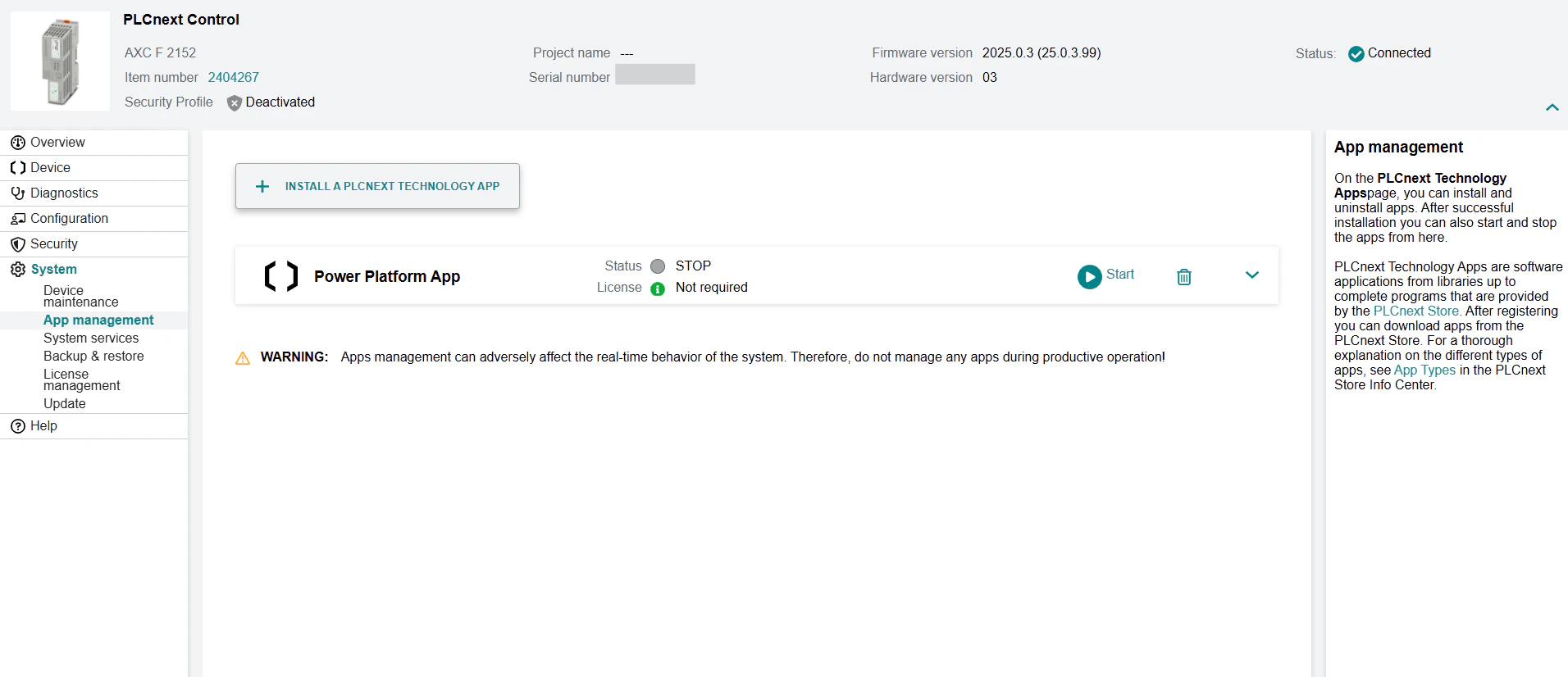
Navigate to the **System** tab in the left navigation plane and select **App Management**.
Click **Install A PLCnext Technology App** and upload the application you want to install on the Power Platform controller. The file must have a `.app` extension.
Click on the **Start** button to start the application.
Repeat steps 3 and 4 for each app you want to install on the Power Platform controller.
 ## Required Apps
There are a few apps that are required to be installed on the Power Platform controller to ensure proper operation. These apps are the **Power Platform App**
and the **Mosquitto MQTT Broker**.
Download the apps from the [PLCnext App Store](https://www.plcnextstore.com) or click on the links below.
### Power Platform App
This application is the runtime developed by Direct Energy Partners. It is required for the controller to interface with all microgrid devices.
Download the Power Platform App from the PLCnext Store.
Make sure to download the latest version 1.1.1 of the Power Platform App.
### Mosquitto MQTT Broker
This application is required to connect MQTT devices to the controller. It runs an MQTT broker directly on the controller, enabling communication with MQTT
devices in the microgrid.
Download the Mosquitto MQTT Broker from the PLCnext Store.
Make sure to download version 2.0.18.4 of the Mosquitto MQTT Broker.
## Required Apps
There are a few apps that are required to be installed on the Power Platform controller to ensure proper operation. These apps are the **Power Platform App**
and the **Mosquitto MQTT Broker**.
Download the apps from the [PLCnext App Store](https://www.plcnextstore.com) or click on the links below.
### Power Platform App
This application is the runtime developed by Direct Energy Partners. It is required for the controller to interface with all microgrid devices.
Download the Power Platform App from the PLCnext Store.
Make sure to download the latest version 1.1.1 of the Power Platform App.
### Mosquitto MQTT Broker
This application is required to connect MQTT devices to the controller. It runs an MQTT broker directly on the controller, enabling communication with MQTT
devices in the microgrid.
Download the Mosquitto MQTT Broker from the PLCnext Store.
Make sure to download version 2.0.18.4 of the Mosquitto MQTT Broker.