This section explains how to log in to the controller’s Web-Based Management (WBM) interface. From the WBM, you can configure network settings, update admin credentials,
and install the required applications. Follow the steps below to get started.
Connect Laptop
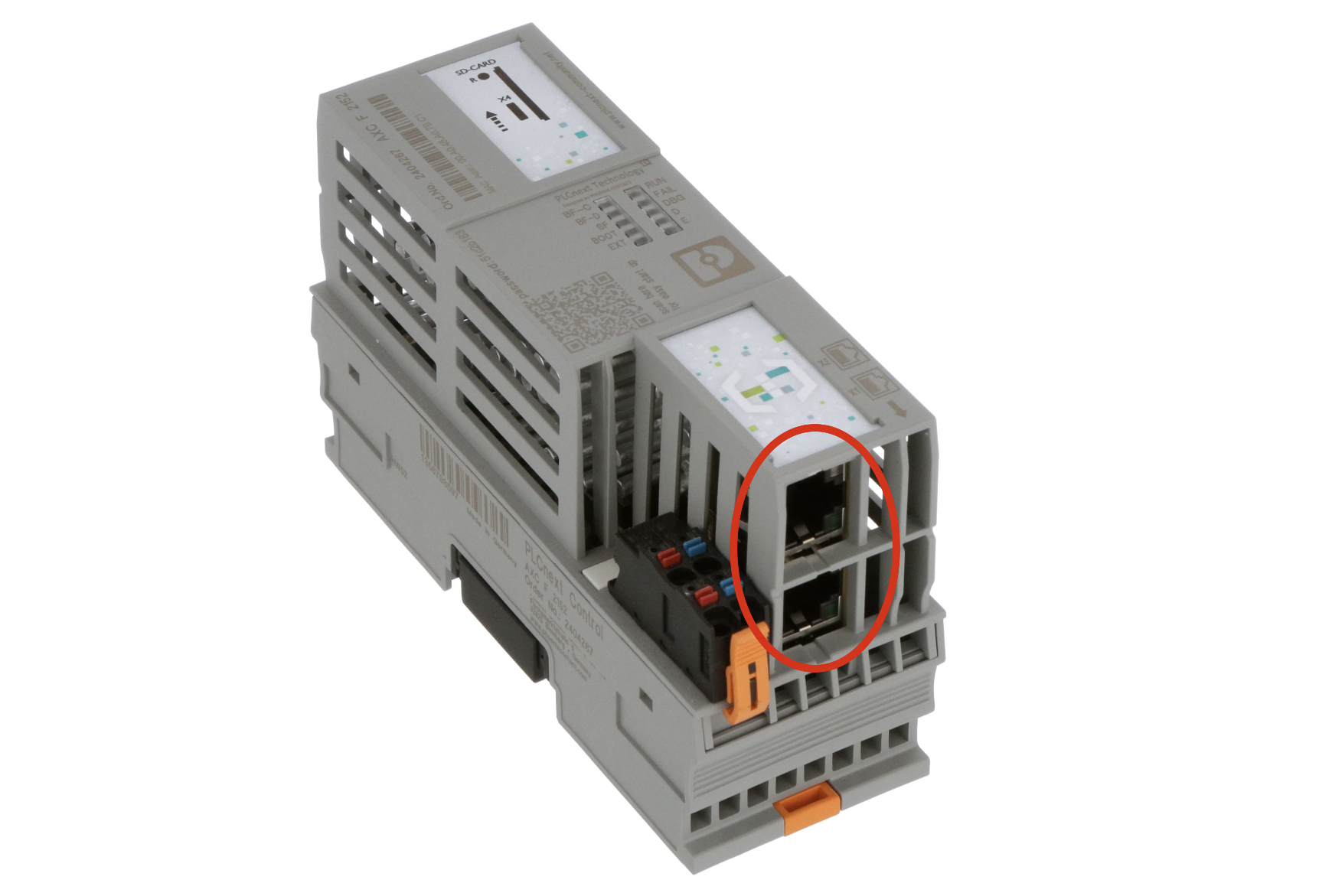
Use an Ethernet cable to connect your laptop directly to the DCIDE Controller. The connection method varies depending on your DCIDE Controller version:
DCIDE Controller: Connect your laptop directly to the DCIDE Controller using any of the two Ethernet ports located at the bottom of the controller.
DCIDE Controller Panel: Connect your laptop to the Ethernet connection port at the bottom of the panel. This port is directly connected to the network switch inside the DCIDE Controller panel.
Setup Laptop
Set your laptop to the same IP range as the DCIDE Controller. This is required to access the DCIDE Controller’s Web-Based Management (WBM) interface.
The default IP address of the DCIDE Controller is 192.168.1.10.
Temporarily change your laptop’s IP settings to be in the same range as the controller’s IP address. To do this, open the network settings on your
laptop and either change or add a new static IP address, subnet mask, and gateway. For example:
IP address:192.168.1.5
Subnet mask:255.255.255.0
Default gateway:192.168.1.1
Below is explained how to change or add the network settings for Windows and Mac.
Show For Windows
1
Open Network Connections
2
Select Properties
Right-click on the desired network connection and select Properties.
3
Select Internet Protocol Version 4
In the pop-up window, select Internet Protocol Version 4 (TCP/IPv4) and click on Properties.
4
Click on Advanced
5
Add Settings
In the next window, add the IP address with the subnet mask and add a default gateway as stated above.
6
Click OK to save the settings
After adding the IP address with the subnet mask and the default gateway, click OK to save the settings.
Show For Mac
1
Open System Settings
Click on the Apple menu in the top-left corner of your screen.
2
Select System Settings
Select System Settings from the drop-down menu.
3
Access Network Settings
In the System Settings window, scroll down and click on Network in the sidebar.
4
Select the Network Interface
On the right side, you will see a list of network interfaces (such as Wi-Fi, Ethernet, etc.).
Select the interface you want to configure (e.g., Wi-Fi or Ethernet).
5
Configure IP Address, Subnet Mask, and Gateway
After selecting the network interface, click on the Details… button.
If you are using macOS Ventura or later: After selecting the network interface, you will see a list of available networks. Scroll down and select TCP/IP.
In the Configure IPv4 drop-down menu, select Manually.
Add the IP address,subnet mask and default gateway as stated above.
6
Save Changes
Once all the details have been entered, click OK to save the settings.
Login to the WBM
1
Open Web Browser
Open a web browser and enter 192.168.1.10/wbm or click on this link.
2
Accept Security Warning
If prompted with a security warning stating ‘Your connection is not private’, click on Advanced and then click on Proceed to 192.168.1.10 (unsafe).
3
Enter Credentials
Log in using the credentials provided to you by DEP:
Username: admin
Password: [printed on the housing of the controller]
{"docsConfig":{"theme":"mint","$schema":"https://mintlify.com/docs.json","name":"DCIDE Controller Documentation","colors":{"primary":"#26A9E0","light":"#26A9E0","dark":"#26A9E0"},"logo":{"light":"https://mintcdn.com/directenergypartners/GRZeYba0GypZc-XC/logo/dcide_controller_logo_black.svg?fit=max\u0026auto=format\u0026n=GRZeYba0GypZc-XC\u0026q=85\u0026s=aea9e1b855eda8649eb8a80bed74b169","dark":"https://mintcdn.com/directenergypartners/GRZeYba0GypZc-XC/logo/dcide_controller_logo_white.svg?fit=max\u0026auto=format\u0026n=GRZeYba0GypZc-XC\u0026q=85\u0026s=9743c74c634428ee99ff977325abaedf"},"favicon":"https://mintcdn.com/directenergypartners/U69FgpALENZ6o9ub/favicon.svg?fit=max\u0026auto=format\u0026n=U69FgpALENZ6o9ub\u0026q=85\u0026s=9e1453db5da84f0a1a3d12f12da0bd99","navbar":{"links":[{"href":"mailto:pplsupport@directenergypartners.com","label":"Support"}],"primary":{"type":"button","label":"Learn More","href":"https://directenergypartners.com/controller"}},"footer":{"socials":{"website":"https://directenergypartners.com/controller","linkedin":"https://www.linkedin.com/company/direct-energy-partners","youtube":"https://www.youtube.com/@dcmicrogriddesignandengine5189"}},"seo":{"metatags":{"og:title":"DCIDE Controller Documentation","og:description":"Complete documentation for the DCIDE Controller - installation, configuration, custom applications, and commissioning guides."}},"contextual":{"options":["copy","view","chatgpt","claude","perplexity","mcp","cursor","vscode"],"display":"header"},"styling":{"latex":false},"navigation":{"global":{"anchors":[]},"pages":[]}},"deployment":{"deploymentMetadataValue":{"subdomain":"directenergypartners","hasAudioNarration":false,"actualSubdomain":"directenergypartners","customDomains":["docs.directenergypartners.com"],"gitSource":{"type":"github","owner":"direct-energy-partners","repo":"ppl-documentation","deployBranch":"main","contentDirectory":"","isPrivate":true,"mountPath":"","label":""},"entitlements":{},"buildId":"6ac8d7caed8c5d5a673a2df5","clientVersion":"0.0.4160","searchFilterCounts":[{"language":"default","tag":"File Configuration","count":32},{"language":"default","tag":"Device Types","count":19},{"language":"default","tag":"Custom Applications","count":11},{"language":"default","tag":"Devices File","count":10},{"language":"default","tag":"Address Map Files","count":9},{"language":"default","tag":"Installation","count":9},{"language":"default","tag":"Commission","count":8},{"language":"default","tag":"PPL-BASE Repository","count":6},{"language":"default","tag":"Settings","count":6},{"language":"default","tag":"Getting Started","count":5}]},"assistantConfig":{},"basePath":"","hasChatPermissions":false,"hasWebMcpPermissions":false,"toggles":[{"name":"kill-isr","enabled":true,"variant":{"name":"disabled","enabled":false,"feature_enabled":true},"impressionData":false},{"name":"custom-rbac-roles","enabled":true,"variant":{"name":"disabled","enabled":false,"feature_enabled":true},"impressionData":false},{"name":"agent-mintlify-slack","enabled":true,"variant":{"name":"disabled","enabled":false,"feature_enabled":true},"impressionData":false},{"name":"agent-integrations-settings","enabled":true,"variant":{"name":"disabled","enabled":false,"feature_enabled":true},"impressionData":false},{"name":"rbac-expansion","enabled":true,"variant":{"name":"disabled","enabled":false,"feature_enabled":true},"impressionData":false},{"name":"automations-pr-grouping","enabled":true,"variant":{"name":"disabled","enabled":false,"feature_enabled":true},"impressionData":false},{"name":"custom-prefix","enabled":true,"variant":{"name":"disabled","enabled":false,"feature_enabled":true},"impressionData":false},{"name":"analytics-v7","enabled":true,"variant":{"name":"disabled","enabled":false,"feature_enabled":true},"impressionData":false},{"name":"user-flows-analytics","enabled":true,"variant":{"name":"disabled","enabled":false,"feature_enabled":true},"impressionData":false},{"name":"no-publish-flow","enabled":true,"variant":{"name":"disabled","enabled":false,"feature_enabled":true},"impressionData":false},{"name":"workos-onboarding","enabled":true,"variant":{"name":"disabled","enabled":false,"feature_enabled":true},"impressionData":false},{"name":"snapshot-serving-live","enabled":true,"variant":{"name":"disabled","enabled":false,"feature_enabled":true},"impressionData":false},{"name":"stripTemperatureMiddleware","enabled":true,"variant":{"name":"disabled","enabled":false,"feature_enabled":true},"impressionData":false},{"name":"support-platform-pylon-zendesk","enabled":true,"variant":{"name":"disabled","enabled":false,"feature_enabled":true},"impressionData":false},{"name":"snapshot-serving","enabled":true,"variant":{"name":"disabled","enabled":false,"feature_enabled":true},"impressionData":false},{"name":"instant-rollback","enabled":true,"variant":{"name":"disabled","enabled":false,"feature_enabled":true},"impressionData":false},{"name":"granular-notifications-server","enabled":true,"variant":{"name":"disabled","enabled":false,"feature_enabled":true},"impressionData":false},{"name":"granular-notifications","enabled":true,"variant":{"name":"disabled","enabled":false,"feature_enabled":true},"impressionData":false},{"name":"automations-fable","enabled":true,"variant":{"name":"disabled","enabled":false,"feature_enabled":true},"impressionData":false},{"name":"fixed-ai-action-pricing","enabled":true,"variant":{"name":"disabled","enabled":false,"feature_enabled":true},"impressionData":false},{"name":"automation-resolve-merge-conflict","enabled":true,"variant":{"name":"disabled","enabled":false,"feature_enabled":true},"impressionData":false},{"name":"scoped-publishing","enabled":true,"variant":{"name":"disabled","enabled":false,"feature_enabled":true},"impressionData":false},{"name":"mintql","enabled":true,"variant":{"name":"disabled","enabled":false,"feature_enabled":true},"impressionData":false},{"name":"page-level-analytics","enabled":true,"variant":{"name":"disabled","enabled":false,"feature_enabled":true},"impressionData":false},{"name":"editor-version-history-v2","enabled":true,"variant":{"name":"disabled","enabled":false,"feature_enabled":true},"impressionData":false},{"name":"billing-page-v2","enabled":true,"variant":{"name":"disabled","enabled":false,"feature_enabled":true},"impressionData":false},{"name":"full-page-search","enabled":true,"variant":{"name":"disabled","enabled":false,"feature_enabled":true},"impressionData":false},{"name":"workspace-projects","enabled":true,"variant":{"name":"disabled","enabled":false,"feature_enabled":true},"impressionData":false},{"name":"assistant-v5","enabled":true,"variant":{"name":"disabled","enabled":false,"feature_enabled":true},"impressionData":false},{"name":"fork-pr-previews","enabled":true,"variant":{"name":"disabled","enabled":false,"feature_enabled":true},"impressionData":false},{"name":"revalidation-jwt","enabled":true,"variant":{"name":"disabled","enabled":false,"feature_enabled":true},"impressionData":false},{"name":"workos-sso-scim","enabled":true,"variant":{"name":"disabled","enabled":false,"feature_enabled":true},"impressionData":false},{"name":"hobby-abuse-scan","enabled":true,"variant":{"name":"disabled","enabled":false,"feature_enabled":true},"impressionData":false},{"name":"dashboard-inbox","enabled":true,"variant":{"name":"disabled","enabled":false,"feature_enabled":true},"impressionData":false},{"name":"workos-signup","enabled":true,"variant":{"name":"disabled","enabled":false,"feature_enabled":true},"impressionData":false},{"name":"turbopuffer-dual-write","enabled":true,"variant":{"name":"disabled","enabled":false,"feature_enabled":true},"impressionData":false},{"name":"workos-enabled","enabled":true,"variant":{"name":"disabled","enabled":false,"feature_enabled":true},"impressionData":false},{"name":"approve-review-flow","enabled":true,"variant":{"name":"disabled","enabled":false,"feature_enabled":true},"impressionData":false},{"name":"editor-metadata","enabled":true,"variant":{"name":"disabled","enabled":false,"feature_enabled":true},"impressionData":false},{"name":"sso-setup-deadline-banner","enabled":true,"variant":{"name":"disabled","enabled":false,"feature_enabled":true},"impressionData":false},{"name":"turbopuffer-serve","enabled":true,"variant":{"name":"disabled","enabled":false,"feature_enabled":true},"impressionData":false},{"name":"live-agents","enabled":true,"variant":{"name":"disabled","enabled":false,"feature_enabled":true},"impressionData":false},{"name":"llms-txt-v2","enabled":true,"variant":{"name":"disabled","enabled":false,"feature_enabled":true},"impressionData":false}],"googleFontsInlined":false},"customCss":[],"page":{"pagePath":"installation/settings/login","slug":"/installation/settings/login","pageMetadata":{"title":"Login","description":null,"href":"/installation/settings/login"},"pageType":"default","mdx":{"mdxSource":{"compiledSource":"\"use strict\";const{Fragment:_Fragment,jsx:_jsx,jsxs:_jsxs}=arguments[0];const{useMDXComponents:_provideComponents}=arguments[0];function _createMdxContent(props){const _components={a:`a`,code:`code`,li:`li`,p:`p`,strong:`strong`,ul:`ul`,..._provideComponents(),...props.components},{Expandable,Heading,Note,OptimizedImage,Step,Steps}=_components;if(!Expandable)_missingMdxReference(`Expandable`,true);if(!Heading)_missingMdxReference(`Heading`,true);if(!Note)_missingMdxReference(`Note`,true);if(!OptimizedImage)_missingMdxReference(`OptimizedImage`,true);if(!Step)_missingMdxReference(`Step`,true);if(!Steps)_missingMdxReference(`Steps`,true);return _jsxs(_Fragment,{children:[_jsx(_components.p,{children:`This section explains how to log in to the controller’s Web-Based Management (WBM) interface. From the WBM, you can configure network settings, update admin credentials,\nand install the required applications. Follow the steps below to get started.`}),`\n`,_jsx(Heading,{level:`3`,id:`connect-laptop`,children:`Connect Laptop`}),`\n`,_jsx(_components.p,{children:`Use an Ethernet cable to connect your laptop directly to the DCIDE Controller. The connection method varies depending on your DCIDE Controller version:`}),`\n`,_jsxs(_components.ul,{children:[`\n`,_jsxs(_components.li,{children:[`\n`,_jsxs(_components.p,{children:[_jsx(_components.strong,{children:`DCIDE Controller:`}),` Connect your laptop directly to the DCIDE Controller using any of the two Ethernet ports located at the bottom of the controller.`]}),`\n`,_jsx(OptimizedImage,{src:`https://mintcdn.com/directenergypartners/U69FgpALENZ6o9ub/images/phoenix_contactaxc_f_2152_ethernet.png?fit=max\u0026auto=format\u0026n=U69FgpALENZ6o9ub\u0026q=85\u0026s=b6586d164550cdd10022d5136aa959e5`,alt:`Phoenix ContactAXC F 2152 Ethernet`,style:{width:`400px`,margin:`auto`},\"data-og-width\":`1723`,width:`1723`,\"data-og-height\":`1171`,height:`1171`,\"data-path\":`images/phoenix_contactaxc_f_2152_ethernet.png`,\"data-optimize\":`true`,\"data-opv\":`3`,srcset:`https://mintcdn.com/directenergypartners/U69FgpALENZ6o9ub/images/phoenix_contactaxc_f_2152_ethernet.png?w=280\u0026fit=max\u0026auto=format\u0026n=U69FgpALENZ6o9ub\u0026q=85\u0026s=d344fb9455761b16c3b8a70db7ddee54 280w, https://mintcdn.com/directenergypartners/U69FgpALENZ6o9ub/images/phoenix_contactaxc_f_2152_ethernet.png?w=560\u0026fit=max\u0026auto=format\u0026n=U69FgpALENZ6o9ub\u0026q=85\u0026s=6afd054f2f1307f848377ddfb65efefb 560w, https://mintcdn.com/directenergypartners/U69FgpALENZ6o9ub/images/phoenix_contactaxc_f_2152_ethernet.png?w=840\u0026fit=max\u0026auto=format\u0026n=U69FgpALENZ6o9ub\u0026q=85\u0026s=081db4c3c32d993dfd7563567d03ecec 840w, https://mintcdn.com/directenergypartners/U69FgpALENZ6o9ub/images/phoenix_contactaxc_f_2152_ethernet.png?w=1100\u0026fit=max\u0026auto=format\u0026n=U69FgpALENZ6o9ub\u0026q=85\u0026s=08aa7c2cb39d50196231501f3511b638 1100w, https://mintcdn.com/directenergypartners/U69FgpALENZ6o9ub/images/phoenix_contactaxc_f_2152_ethernet.png?w=1650\u0026fit=max\u0026auto=format\u0026n=U69FgpALENZ6o9ub\u0026q=85\u0026s=19e026480ca4b5a3adf2cc61386fecd5 1650w, https://mintcdn.com/directenergypartners/U69FgpALENZ6o9ub/images/phoenix_contactaxc_f_2152_ethernet.png?w=2500\u0026fit=max\u0026auto=format\u0026n=U69FgpALENZ6o9ub\u0026q=85\u0026s=bdbcda8557b90cae4db75c7ae056f0df 2500w`}),`\n`]}),`\n`,_jsxs(_components.li,{children:[`\n`,_jsxs(_components.p,{children:[_jsx(_components.strong,{children:`DCIDE Controller Panel:`}),` Connect your laptop to the Ethernet connection port at the bottom of the panel. This port is directly connected to the network switch inside the DCIDE Controller panel.`]}),`\n`]}),`\n`]}),`\n`,_jsx(Heading,{level:`3`,id:`setup-laptop`,children:`Setup Laptop`}),`\n`,_jsx(_components.p,{children:`Set your laptop to the same IP range as the DCIDE Controller. This is required to access the DCIDE Controller’s Web-Based Management (WBM) interface.`}),`\n`,_jsx(Note,{children:_jsxs(_components.p,{children:[`The default IP address of the DCIDE Controller is `,_jsx(_components.code,{children:`192.168.1.10`}),`.`]})}),`\n`,_jsx(_components.p,{children:`Temporarily change your laptop’s IP settings to be in the same range as the controller’s IP address. To do this, open the network settings on your\nlaptop and either change or add a new static IP address, subnet mask, and gateway. For example:`}),`\n`,_jsxs(_components.ul,{children:[`\n`,_jsxs(_components.li,{children:[_jsx(_components.strong,{children:`IP address:`}),` `,_jsx(_components.code,{children:`192.168.1.5`})]}),`\n`,_jsxs(_components.li,{children:[_jsx(_components.strong,{children:`Subnet mask:`}),` `,_jsx(_components.code,{children:`255.255.255.0`})]}),`\n`,_jsxs(_components.li,{children:[_jsx(_components.strong,{children:`Default gateway:`}),` `,_jsx(_components.code,{children:`192.168.1.1`})]}),`\n`]}),`\n`,_jsx(_components.p,{children:`Below is explained how to change or add the network settings for Windows and Mac.`}),`\n`,_jsx(Expandable,{title:`For Windows`,children:_jsxs(Steps,{children:[_jsx(Step,{title:`Open Network Connections`}),_jsxs(Step,{title:`Select Properties`,children:[_jsxs(_components.p,{children:[`Right-click on the desired network connection and select `,_jsx(_components.strong,{children:`Properties`}),`.`]}),_jsx(OptimizedImage,{src:`https://mintcdn.com/directenergypartners/U69FgpALENZ6o9ub/images/windows_network_connections.png?fit=max\u0026auto=format\u0026n=U69FgpALENZ6o9ub\u0026q=85\u0026s=941fecdea9cd65a084219ab853034aa6`,alt:`Windows Network Connections`,style:{margin:`auto`},\"data-og-width\":`1357`,width:`1357`,\"data-og-height\":`663`,height:`663`,\"data-path\":`images/windows_network_connections.png`,\"data-optimize\":`true`,\"data-opv\":`3`,srcset:`https://mintcdn.com/directenergypartners/U69FgpALENZ6o9ub/images/windows_network_connections.png?w=280\u0026fit=max\u0026auto=format\u0026n=U69FgpALENZ6o9ub\u0026q=85\u0026s=6651c62015f9e916bf7eb7bfc0ccabc0 280w, https://mintcdn.com/directenergypartners/U69FgpALENZ6o9ub/images/windows_network_connections.png?w=560\u0026fit=max\u0026auto=format\u0026n=U69FgpALENZ6o9ub\u0026q=85\u0026s=cb3bf4b5f01d17078cab36f72f3e9594 560w, https://mintcdn.com/directenergypartners/U69FgpALENZ6o9ub/images/windows_network_connections.png?w=840\u0026fit=max\u0026auto=format\u0026n=U69FgpALENZ6o9ub\u0026q=85\u0026s=9696452bcbd09d0a140639b477ccb49f 840w, https://mintcdn.com/directenergypartners/U69FgpALENZ6o9ub/images/windows_network_connections.png?w=1100\u0026fit=max\u0026auto=format\u0026n=U69FgpALENZ6o9ub\u0026q=85\u0026s=54a145fecd6ffe39f2d13bd832899e71 1100w, https://mintcdn.com/directenergypartners/U69FgpALENZ6o9ub/images/windows_network_connections.png?w=1650\u0026fit=max\u0026auto=format\u0026n=U69FgpALENZ6o9ub\u0026q=85\u0026s=63256fbf6b166d6e89b2bda5209c1811 1650w, https://mintcdn.com/directenergypartners/U69FgpALENZ6o9ub/images/windows_network_connections.png?w=2500\u0026fit=max\u0026auto=format\u0026n=U69FgpALENZ6o9ub\u0026q=85\u0026s=ba9387a776c46588972a8710b100069d 2500w`})]}),_jsxs(Step,{title:`Select Internet Protocol Version 4`,children:[_jsxs(_components.p,{children:[`In the pop-up window, select `,_jsx(_components.strong,{children:`Internet Protocol Version 4 (TCP/IPv4)`}),` and click on `,_jsx(_components.strong,{children:`Properties`}),`.`]}),_jsx(OptimizedImage,{src:`https://mintcdn.com/directenergypartners/U69FgpALENZ6o9ub/images/windows_network_properties.png?fit=max\u0026auto=format\u0026n=U69FgpALENZ6o9ub\u0026q=85\u0026s=ceef93649ab129da2538dafe2d083fec`,alt:`Windows Network Properties`,style:{width:`300px`,margin:`auto`},\"data-og-width\":`532`,width:`532`,\"data-og-height\":`688`,height:`688`,\"data-path\":`images/windows_network_properties.png`,\"data-optimize\":`true`,\"data-opv\":`3`,srcset:`https://mintcdn.com/directenergypartners/U69FgpALENZ6o9ub/images/windows_network_properties.png?w=280\u0026fit=max\u0026auto=format\u0026n=U69FgpALENZ6o9ub\u0026q=85\u0026s=6d3f008f40a9dbb14951d7c51b008f05 280w, https://mintcdn.com/directenergypartners/U69FgpALENZ6o9ub/images/windows_network_properties.png?w=560\u0026fit=max\u0026auto=format\u0026n=U69FgpALENZ6o9ub\u0026q=85\u0026s=df9ea68c1500cf5e016758fc6230c653 560w, https://mintcdn.com/directenergypartners/U69FgpALENZ6o9ub/images/windows_network_properties.png?w=840\u0026fit=max\u0026auto=format\u0026n=U69FgpALENZ6o9ub\u0026q=85\u0026s=b874e95a99a08c3b05b25b8074627f43 840w, https://mintcdn.com/directenergypartners/U69FgpALENZ6o9ub/images/windows_network_properties.png?w=1100\u0026fit=max\u0026auto=format\u0026n=U69FgpALENZ6o9ub\u0026q=85\u0026s=e33ecc00ff2bd54ade88fb440ed2ded6 1100w, https://mintcdn.com/directenergypartners/U69FgpALENZ6o9ub/images/windows_network_properties.png?w=1650\u0026fit=max\u0026auto=format\u0026n=U69FgpALENZ6o9ub\u0026q=85\u0026s=ede5a967e5a4074a29362a503f0dde06 1650w, https://mintcdn.com/directenergypartners/U69FgpALENZ6o9ub/images/windows_network_properties.png?w=2500\u0026fit=max\u0026auto=format\u0026n=U69FgpALENZ6o9ub\u0026q=85\u0026s=e449ad98bf646b34a4b1aea5eefd984b 2500w`})]}),_jsx(Step,{title:`Click on Advanced`,children:_jsx(OptimizedImage,{src:`https://mintcdn.com/directenergypartners/U69FgpALENZ6o9ub/images/windows_network_tcpip.png?fit=max\u0026auto=format\u0026n=U69FgpALENZ6o9ub\u0026q=85\u0026s=8c71ab44f9240e475361b87054a9d232`,alt:`Windows Network TCP/IP`,style:{width:`300px`,margin:`auto`},\"data-og-width\":`586`,width:`586`,\"data-og-height\":`667`,height:`667`,\"data-path\":`images/windows_network_tcpip.png`,\"data-optimize\":`true`,\"data-opv\":`3`,srcset:`https://mintcdn.com/directenergypartners/U69FgpALENZ6o9ub/images/windows_network_tcpip.png?w=280\u0026fit=max\u0026auto=format\u0026n=U69FgpALENZ6o9ub\u0026q=85\u0026s=0fb9e57dc25b85af80b37bedf7d70fe9 280w, https://mintcdn.com/directenergypartners/U69FgpALENZ6o9ub/images/windows_network_tcpip.png?w=560\u0026fit=max\u0026auto=format\u0026n=U69FgpALENZ6o9ub\u0026q=85\u0026s=887f1d1ca6982bbdd2569e2491de6f3e 560w, https://mintcdn.com/directenergypartners/U69FgpALENZ6o9ub/images/windows_network_tcpip.png?w=840\u0026fit=max\u0026auto=format\u0026n=U69FgpALENZ6o9ub\u0026q=85\u0026s=2516f93a1f3473df6a846a0942963cd8 840w, https://mintcdn.com/directenergypartners/U69FgpALENZ6o9ub/images/windows_network_tcpip.png?w=1100\u0026fit=max\u0026auto=format\u0026n=U69FgpALENZ6o9ub\u0026q=85\u0026s=0f5b003bb397f2d500eb393f4cfb19f0 1100w, https://mintcdn.com/directenergypartners/U69FgpALENZ6o9ub/images/windows_network_tcpip.png?w=1650\u0026fit=max\u0026auto=format\u0026n=U69FgpALENZ6o9ub\u0026q=85\u0026s=53775cb6d2568010f6b96937cee5779e 1650w, https://mintcdn.com/directenergypartners/U69FgpALENZ6o9ub/images/windows_network_tcpip.png?w=2500\u0026fit=max\u0026auto=format\u0026n=U69FgpALENZ6o9ub\u0026q=85\u0026s=0ed90745e192cd421b7498e264147d11 2500w`})}),_jsxs(Step,{title:`Add Settings`,children:[_jsxs(_components.p,{children:[`In the next window, add the `,_jsx(_components.strong,{children:`IP address`}),` with the `,_jsx(_components.strong,{children:`subnet mask`}),` and add a `,_jsx(_components.strong,{children:`default gateway`}),` as stated above.`]}),_jsx(OptimizedImage,{src:`https://mintcdn.com/directenergypartners/U69FgpALENZ6o9ub/images/windows_network_advanced.png?fit=max\u0026auto=format\u0026n=U69FgpALENZ6o9ub\u0026q=85\u0026s=1cd588e1952c693d19b83b5614545938`,alt:`Windows Network Advanced`,style:{width:`300px`,margin:`auto`},\"data-og-width\":`589`,width:`589`,\"data-og-height\":`717`,height:`717`,\"data-path\":`images/windows_network_advanced.png`,\"data-optimize\":`true`,\"data-opv\":`3`,srcset:`https://mintcdn.com/directenergypartners/U69FgpALENZ6o9ub/images/windows_network_advanced.png?w=280\u0026fit=max\u0026auto=format\u0026n=U69FgpALENZ6o9ub\u0026q=85\u0026s=c9117ba8322cc8742804182ed83be6a7 280w, https://mintcdn.com/directenergypartners/U69FgpALENZ6o9ub/images/windows_network_advanced.png?w=560\u0026fit=max\u0026auto=format\u0026n=U69FgpALENZ6o9ub\u0026q=85\u0026s=9490c1de4ba7f0044d8c0b56c4ea905d 560w, https://mintcdn.com/directenergypartners/U69FgpALENZ6o9ub/images/windows_network_advanced.png?w=840\u0026fit=max\u0026auto=format\u0026n=U69FgpALENZ6o9ub\u0026q=85\u0026s=6789b663b30cbd1c0c0d2aa26dc5f65e 840w, https://mintcdn.com/directenergypartners/U69FgpALENZ6o9ub/images/windows_network_advanced.png?w=1100\u0026fit=max\u0026auto=format\u0026n=U69FgpALENZ6o9ub\u0026q=85\u0026s=4e99cf24673028b7500d6159ea745283 1100w, https://mintcdn.com/directenergypartners/U69FgpALENZ6o9ub/images/windows_network_advanced.png?w=1650\u0026fit=max\u0026auto=format\u0026n=U69FgpALENZ6o9ub\u0026q=85\u0026s=65885872441e831f62b0fb65ae227cb8 1650w, https://mintcdn.com/directenergypartners/U69FgpALENZ6o9ub/images/windows_network_advanced.png?w=2500\u0026fit=max\u0026auto=format\u0026n=U69FgpALENZ6o9ub\u0026q=85\u0026s=e96440374c7f04db6920cb862f5a80b0 2500w`})]}),_jsx(Step,{title:`Click OK to save the settings`,children:_jsxs(_components.p,{children:[`After adding the IP address with the subnet mask and the default gateway, click `,_jsx(_components.strong,{children:`OK`}),` to save the settings.`]})})]})}),`\n`,_jsx(Expandable,{title:`For Mac`,children:_jsxs(Steps,{children:[_jsx(Step,{title:`Open System Settings`,children:_jsxs(_components.p,{children:[`Click on the `,_jsx(_components.strong,{children:`Apple`}),` menu in the top-left corner of your screen.`]})}),_jsx(Step,{title:`Select System Settings`,children:_jsxs(_components.p,{children:[`Select `,_jsx(_components.strong,{children:`System Settings`}),` from the drop-down menu.`]})}),_jsx(Step,{title:`Access Network Settings`,children:_jsxs(_components.p,{children:[`In the `,_jsx(_components.strong,{children:`System Settings`}),` window, scroll down and click on `,_jsx(_components.strong,{children:`Network`}),` in the sidebar.`]})}),_jsx(Step,{title:`Select the Network Interface`,children:_jsxs(_components.p,{children:[`On the right side, you will see a list of network interfaces (such as Wi-Fi, Ethernet, etc.).\nSelect the interface you want to configure (e.g., `,_jsx(_components.strong,{children:`Wi-Fi`}),` or `,_jsx(_components.strong,{children:`Ethernet`}),`).`]})}),_jsxs(Step,{title:`Configure IP Address, Subnet Mask, and Gateway`,children:[_jsxs(_components.p,{children:[`After selecting the network interface, click on the `,_jsx(_components.strong,{children:`Details…`}),` button.`]}),_jsxs(_components.ul,{children:[`\n`,_jsxs(_components.li,{children:[`If you are using macOS Ventura or later: After selecting the network interface, you will see a list of available networks. Scroll down and select `,_jsx(_components.strong,{children:`TCP/IP`}),`.`]}),`\n`,_jsxs(_components.li,{children:[`In the `,_jsx(_components.strong,{children:`Configure IPv4`}),` drop-down menu, select `,_jsx(_components.strong,{children:`Manually`}),`.`]}),`\n`,_jsxs(_components.li,{children:[`Add the `,_jsx(_components.strong,{children:`IP address,`}),` `,_jsx(_components.strong,{children:`subnet mask`}),` and `,_jsx(_components.strong,{children:`default gateway`}),` as stated above.`]}),`\n`]})]}),_jsx(Step,{title:`Save Changes`,children:_jsxs(_components.p,{children:[`Once all the details have been entered, click `,_jsx(_components.strong,{children:`OK`}),` to save the settings.`]})})]})}),`\n`,_jsx(Heading,{level:`3`,id:`login-to-the-wbm`,children:`Login to the WBM`}),`\n`,_jsxs(Steps,{children:[_jsx(Step,{title:`Open Web Browser`,children:_jsxs(_components.p,{children:[`Open a web browser and enter `,_jsx(_components.code,{children:`192.168.1.10/wbm`}),` or click on this `,_jsx(_components.a,{href:`https://192.168.1.10/wbm`,children:`link`}),`.`]})}),_jsxs(Step,{title:`Accept Security Warning`,children:[_jsxs(_components.p,{children:[`If prompted with a security warning stating ‘`,_jsx(_components.strong,{children:`Your connection is not private`}),`’, click on `,_jsx(_components.strong,{children:`Advanced`}),` and then click on `,_jsx(_components.strong,{children:`Proceed to 192.168.1.10 (unsafe)`}),`.`]}),_jsx(OptimizedImage,{src:`https://mintcdn.com/directenergypartners/U69FgpALENZ6o9ub/images/wbm_connection_private.png?fit=max\u0026auto=format\u0026n=U69FgpALENZ6o9ub\u0026q=85\u0026s=6981743b6b15c73c6633e20db724ff37`,alt:`WBM Connection Private`,style:{width:`400px`,margin:`auto`},\"data-og-width\":`985`,width:`985`,\"data-og-height\":`846`,height:`846`,\"data-path\":`images/wbm_connection_private.png`,\"data-optimize\":`true`,\"data-opv\":`3`,srcset:`https://mintcdn.com/directenergypartners/U69FgpALENZ6o9ub/images/wbm_connection_private.png?w=280\u0026fit=max\u0026auto=format\u0026n=U69FgpALENZ6o9ub\u0026q=85\u0026s=25fc420f4b6b1fa0d3377005904c6c3d 280w, https://mintcdn.com/directenergypartners/U69FgpALENZ6o9ub/images/wbm_connection_private.png?w=560\u0026fit=max\u0026auto=format\u0026n=U69FgpALENZ6o9ub\u0026q=85\u0026s=56096f3746d8f5725ed9e259c550cd45 560w, https://mintcdn.com/directenergypartners/U69FgpALENZ6o9ub/images/wbm_connection_private.png?w=840\u0026fit=max\u0026auto=format\u0026n=U69FgpALENZ6o9ub\u0026q=85\u0026s=18dee8596003654a3cab10d58a821eae 840w, https://mintcdn.com/directenergypartners/U69FgpALENZ6o9ub/images/wbm_connection_private.png?w=1100\u0026fit=max\u0026auto=format\u0026n=U69FgpALENZ6o9ub\u0026q=85\u0026s=f246eeaba67b29e88f8b9f916751bdb5 1100w, https://mintcdn.com/directenergypartners/U69FgpALENZ6o9ub/images/wbm_connection_private.png?w=1650\u0026fit=max\u0026auto=format\u0026n=U69FgpALENZ6o9ub\u0026q=85\u0026s=9aacc5118fd40ec2b25d0b76d767ff7c 1650w, https://mintcdn.com/directenergypartners/U69FgpALENZ6o9ub/images/wbm_connection_private.png?w=2500\u0026fit=max\u0026auto=format\u0026n=U69FgpALENZ6o9ub\u0026q=85\u0026s=63757cd4a4f84e9e7c266f0ca794d6d3 2500w`})]}),_jsxs(Step,{title:`Enter Credentials`,children:[_jsx(_components.p,{children:`Log in using the credentials provided to you by DEP:`}),_jsxs(_components.ul,{children:[`\n`,_jsxs(_components.li,{children:[`Username: `,_jsx(_components.code,{children:`admin`})]}),`\n`,_jsxs(_components.li,{children:[`Password: `,_jsx(_components.code,{children:`[printed on the housing of the controller]`})]}),`\n`]}),_jsx(OptimizedImage,{src:`https://mintcdn.com/directenergypartners/NUG_FidRKWJZAe9-/images/wbm_login_screen.png?fit=max\u0026auto=format\u0026n=NUG_FidRKWJZAe9-\u0026q=85\u0026s=e46e88608e485493823fd8099dd4b958`,alt:`WBM Login Screen`,style:{margin:`auto`},\"data-og-width\":`1960`,width:`1960`,\"data-og-height\":`1134`,height:`1134`,\"data-path\":`images/wbm_login_screen.png`,\"data-optimize\":`true`,\"data-opv\":`3`,srcset:`https://mintcdn.com/directenergypartners/NUG_FidRKWJZAe9-/images/wbm_login_screen.png?w=280\u0026fit=max\u0026auto=format\u0026n=NUG_FidRKWJZAe9-\u0026q=85\u0026s=7707ba1f845ccd72d07b4be2dc4009b5 280w, https://mintcdn.com/directenergypartners/NUG_FidRKWJZAe9-/images/wbm_login_screen.png?w=560\u0026fit=max\u0026auto=format\u0026n=NUG_FidRKWJZAe9-\u0026q=85\u0026s=c6e23e255805191f7ea5358b47fe86db 560w, https://mintcdn.com/directenergypartners/NUG_FidRKWJZAe9-/images/wbm_login_screen.png?w=840\u0026fit=max\u0026auto=format\u0026n=NUG_FidRKWJZAe9-\u0026q=85\u0026s=abaea954cea096b909edc67f5ecd7fd4 840w, https://mintcdn.com/directenergypartners/NUG_FidRKWJZAe9-/images/wbm_login_screen.png?w=1100\u0026fit=max\u0026auto=format\u0026n=NUG_FidRKWJZAe9-\u0026q=85\u0026s=7e00b2af976749c3bd097727a91b0786 1100w, https://mintcdn.com/directenergypartners/NUG_FidRKWJZAe9-/images/wbm_login_screen.png?w=1650\u0026fit=max\u0026auto=format\u0026n=NUG_FidRKWJZAe9-\u0026q=85\u0026s=5bf3d9b5a82f48fc8be3b9c4ceec46e0 1650w, https://mintcdn.com/directenergypartners/NUG_FidRKWJZAe9-/images/wbm_login_screen.png?w=2500\u0026fit=max\u0026auto=format\u0026n=NUG_FidRKWJZAe9-\u0026q=85\u0026s=a8d5ea7c97c933a4e4b64684815c0090 2500w`})]})]})]})}function MDXContent(props={}){const{wrapper:MDXLayout}={..._provideComponents(),...props.components};return MDXLayout?_jsx(MDXLayout,{...props,children:_jsx(_createMdxContent,{...props})}):_createMdxContent(props)}return{default:MDXContent};function _missingMdxReference(id,component){throw new Error(`Expected `+(component?`component`:`object`)+\" `\"+id+\"` to be defined: you likely forgot to import, pass, or provide it.\")}","frontmatter":{},"scope":{"config":{},"pageMetadata":{"title":"Login","description":null,"href":"/installation/settings/login"}}},"mdxSourceWithNoJs":null},"mdxExtracts":{"tableOfContents":[{"title":"Connect Laptop","slug":"connect-laptop","depth":3,"children":[]},{"title":"Setup Laptop","slug":"setup-laptop","depth":3,"children":[]},{"title":"Login to the WBM","slug":"login-to-the-wbm","depth":3,"children":[]}],"codeExamples":{}},"jsLinks":[],"subdomain":"directenergypartners","siteName":"DCIDE Controller Documentation","title":"DCIDE Controller Documentation","navMaps":{"firstHrefInVersion":{},"firstHrefInLanguage":{}},"lastModified":"2026-10-08T15:09:14.135Z","originalFileLocation":"installation/settings/login.mdx"},"headHtml":"\u003cscript data-mint-head>(function(){var d=document.documentElement,p=null;if(!p){try{p=localStorage.getItem(\"isDarkMode\")}catch(e){}if(p==='true')p='dark';else if(p==='false')p='light';if(p!=='light'\u0026\u0026p!=='dark'\u0026\u0026p!=='system')p=\"system\"}var r=p==='system'?(matchMedia(\"(prefers-color-scheme: dark)\").matches?'dark':'light'):p;d.classList.remove(r==='dark'?'light':'dark');d.classList.add(r);d.setAttribute(\"data-theme-preference\",p)})();\u003c/script>\u003cmeta data-mint-head name=\"application-name\" content=\"DCIDE Controller Documentation\">\u003cmeta data-mint-head name=\"generator\" content=\"Mintlify\">\u003clink data-mint-head rel=\"icon\" type=\"image/png\" sizes=\"192x192\" href=\"/mintlify-assets/_mintlify/favicons/directenergypartners/S-ynqS2wzs2juhvd/_generated/favicon/android-chrome-192x192.png\" media=\"(prefers-color-scheme: light)\">\u003clink data-mint-head rel=\"apple-touch-icon\" type=\"image/png\" sizes=\"180x180\" href=\"/mintlify-assets/_mintlify/favicons/directenergypartners/S-ynqS2wzs2juhvd/_generated/favicon/apple-touch-icon.png\">\u003clink data-mint-head rel=\"icon\" type=\"image/png\" sizes=\"16x16\" href=\"/mintlify-assets/_mintlify/favicons/directenergypartners/S-ynqS2wzs2juhvd/_generated/favicon/favicon-16x16.png\" media=\"(prefers-color-scheme: light)\">\u003clink data-mint-head rel=\"icon\" type=\"image/png\" sizes=\"32x32\" href=\"/mintlify-assets/_mintlify/favicons/directenergypartners/S-ynqS2wzs2juhvd/_generated/favicon/favicon-32x32.png\" media=\"(prefers-color-scheme: light)\">\u003clink data-mint-head rel=\"shortcut icon\" type=\"image/x-icon\" href=\"/mintlify-assets/_mintlify/favicons/directenergypartners/S-ynqS2wzs2juhvd/_generated/favicon/favicon.ico\" media=\"(prefers-color-scheme: light)\">\u003clink data-mint-head rel=\"icon\" type=\"image/png\" sizes=\"192x192\" href=\"/mintlify-assets/_mintlify/favicons/directenergypartners/S-ynqS2wzs2juhvd/_generated/favicon-dark/android-chrome-192x192.png\" media=\"(prefers-color-scheme: dark)\">\u003clink data-mint-head rel=\"icon\" type=\"image/png\" sizes=\"16x16\" href=\"/mintlify-assets/_mintlify/favicons/directenergypartners/S-ynqS2wzs2juhvd/_generated/favicon-dark/favicon-16x16.png\" media=\"(prefers-color-scheme: dark)\">\u003clink data-mint-head rel=\"icon\" type=\"image/png\" sizes=\"32x32\" href=\"/mintlify-assets/_mintlify/favicons/directenergypartners/S-ynqS2wzs2juhvd/_generated/favicon-dark/favicon-32x32.png\" media=\"(prefers-color-scheme: dark)\">\u003clink data-mint-head rel=\"shortcut icon\" type=\"image/x-icon\" href=\"/mintlify-assets/_mintlify/favicons/directenergypartners/S-ynqS2wzs2juhvd/_generated/favicon-dark/favicon.ico\" media=\"(prefers-color-scheme: dark)\">\u003cmeta data-mint-head property=\"og:title\" content=\"DCIDE Controller Documentation\">\u003cmeta data-mint-head property=\"og:description\" content=\"Complete documentation for the DCIDE Controller - installation, configuration, custom applications, and commissioning guides.\">\u003cmeta data-mint-head property=\"og:site_name\" content=\"DCIDE Controller Documentation\">\u003cmeta data-mint-head property=\"og:url\" content=\"https://docs.directenergypartners.com/installation/settings/login\">\u003cmeta data-mint-head property=\"og:type\" content=\"website\">\u003cmeta data-mint-head property=\"og:image\" content=\"https://directenergypartners.mintlify.site/_mintlify/api/og/v2?division=Settings\u0026amp;title=Login\u0026amp;theme=e65adbd682a0369dc859b3a5\u0026amp;signature=0196eee28f0ab68399d84ee302fb454e4a600b29de226a3297511cea8285cd2e\">\u003cmeta data-mint-head property=\"og:image:width\" content=\"1200\">\u003cmeta data-mint-head property=\"og:image:height\" content=\"630\">\u003cmeta data-mint-head name=\"twitter:card\" content=\"summary_large_image\">\u003cmeta data-mint-head name=\"twitter:title\" content=\"DCIDE Controller Documentation\">\u003cmeta data-mint-head name=\"twitter:description\" content=\"Complete documentation for the DCIDE Controller - installation, configuration, custom applications, and commissioning guides.\">\u003cmeta data-mint-head name=\"twitter:image\" content=\"https://directenergypartners.mintlify.site/_mintlify/api/og/v2?division=Settings\u0026amp;title=Login\u0026amp;theme=e65adbd682a0369dc859b3a5\u0026amp;signature=0196eee28f0ab68399d84ee302fb454e4a600b29de226a3297511cea8285cd2e\">\u003cmeta data-mint-head name=\"twitter:image:width\" content=\"1200\">\u003cmeta data-mint-head name=\"twitter:image:height\" content=\"630\">\u003cmeta data-mint-head name=\"msapplication-config\" content=\"/mintlify-assets/_mintlify/favicons/directenergypartners/S-ynqS2wzs2juhvd/_generated/favicon/browserconfig.xml\">\u003cmeta data-mint-head name=\"apple-mobile-web-app-title\" content=\"DCIDE Controller Documentation\">\u003cmeta data-mint-head name=\"msapplication-TileColor\" content=\"#26A9E0\">\u003clink data-mint-head rel=\"canonical\" href=\"https://docs.directenergypartners.com/installation/settings/login\">\u003clink data-mint-head rel=\"alternate\" type=\"application/xml\" href=\"/sitemap.xml\">\u003clink data-mint-head rel=\"alternate\" type=\"text/markdown\" href=\"/installation/settings/login.md\">\u003cscript data-mint-head type=\"application/ld+json\">{\"@context\":\"https://schema.org\",\"@graph\":[{\"@type\":\"Organization\",\"@id\":\"https://docs.directenergypartners.com/#organization\",\"name\":\"DCIDE Controller Documentation\",\"url\":\"https://docs.directenergypartners.com\",\"logo\":{\"@type\":\"ImageObject\",\"url\":\"https://mintcdn.com/directenergypartners/GRZeYba0GypZc-XC/logo/dcide_controller_logo_black.svg?fit=max\u0026auto=format\u0026n=GRZeYba0GypZc-XC\u0026q=85\u0026s=aea9e1b855eda8649eb8a80bed74b169\"}},{\"@type\":\"WebSite\",\"@id\":\"https://docs.directenergypartners.com#website\",\"name\":\"DCIDE Controller Documentation\",\"url\":\"https://docs.directenergypartners.com\",\"publisher\":{\"@id\":\"https://docs.directenergypartners.com/#organization\"}},{\"@type\":\"WebPage\",\"@id\":\"https://docs.directenergypartners.com/installation/settings/login#webpage\",\"url\":\"https://docs.directenergypartners.com/installation/settings/login\",\"name\":\"Login\",\"dateModified\":\"2026-10-08T15:09:14.135Z\",\"isPartOf\":{\"@id\":\"https://docs.directenergypartners.com#website\"},\"breadcrumb\":{\"@id\":\"https://docs.directenergypartners.com/installation/settings/login#breadcrumb\"}},{\"@type\":\"BreadcrumbList\",\"@id\":\"https://docs.directenergypartners.com/installation/settings/login#breadcrumb\",\"itemListElement\":[{\"@type\":\"ListItem\",\"position\":1,\"name\":\"DCIDE Controller Documentation\",\"item\":\"https://docs.directenergypartners.com\"},{\"@type\":\"ListItem\",\"position\":2,\"name\":\"Login\",\"item\":\"https://docs.directenergypartners.com/installation/settings/login\"}]},{\"@type\":[\"Article\",\"TechArticle\"],\"@id\":\"https://docs.directenergypartners.com/installation/settings/login#article\",\"headline\":\"Login\",\"name\":\"Login\",\"url\":\"https://docs.directenergypartners.com/installation/settings/login\",\"mainEntityOfPage\":{\"@id\":\"https://docs.directenergypartners.com/installation/settings/login#webpage\"},\"dateModified\":\"2026-10-08T15:09:14.135Z\",\"publisher\":{\"@id\":\"https://docs.directenergypartners.com/#organization\"},\"isPartOf\":{\"@id\":\"https://docs.directenergypartners.com#website\"}}]}\u003c/script>\u003cscript data-mint-head type=\"application/ld+json\">{\"@context\":\"https://schema.org\",\"@type\":\"WebSite\",\"name\":\"DCIDE Controller Documentation\",\"publisher\":{\"@type\":\"Organization\",\"name\":\"DCIDE Controller Documentation\"},\"provider\":{\"@type\":\"Organization\",\"name\":\"Mintlify\",\"url\":\"https://mintlify.com\"}}\u003c/script>","agentPointerHref":"/installation/settings/login.md","siteName":"DCIDE Controller Documentation","nav":{"global":{"anchors":[]},"tabs":[{"tab":"Installation","groups":[{"group":"Getting Started","pages":[{"title":"Introduction","href":"/installation"}]},{"group":"Power Up","pages":[{"title":"Power Supply","description":null,"href":"/installation/power/power-supply"}]},{"group":"Settings","pages":[{"title":"Login","href":"/installation/settings/login"},{"title":"Network","description":null,"href":"/installation/settings/network"},{"title":"Credentials","href":"/installation/settings/credentials"},{"title":"Firmware Update","href":"/installation/settings/update"},{"title":"App Installation","href":"/installation/settings/app"},{"title":"License","href":"/installation/settings/license"}]},{"group":"Support","pages":[{"title":"Remote Access","href":"/installation/support/remote-access"}]}]},{"tab":"File Configuration","pages":[{"title":"File Configuration","href":"/configure"}]},{"tab":"Custom Applications","pages":[{"title":"Custom Applications","href":"/custom-applications"}]},{"tab":"Commission","pages":[{"title":"Commission","href":"/commission"}]}]},"basePath":"","title":"DCIDE Controller Documentation","buildId":"dpl_GRSyrvXT6FFTpZZTGz5iZPp3D2zE","deploymentId":"dpl_GRSyrvXT6FFTpZZTGz5iZPp3D2zE","dynamics":["a74be98ba7"],"chunks":["zoom-image-lightbox-D5uLWhtj.js","lightbox-handle-r17bVUz3.js"]}